Free HypeStat Accounts: Follow Websites, Get Traffic Alerts and Use the API
Nov 6, 2026
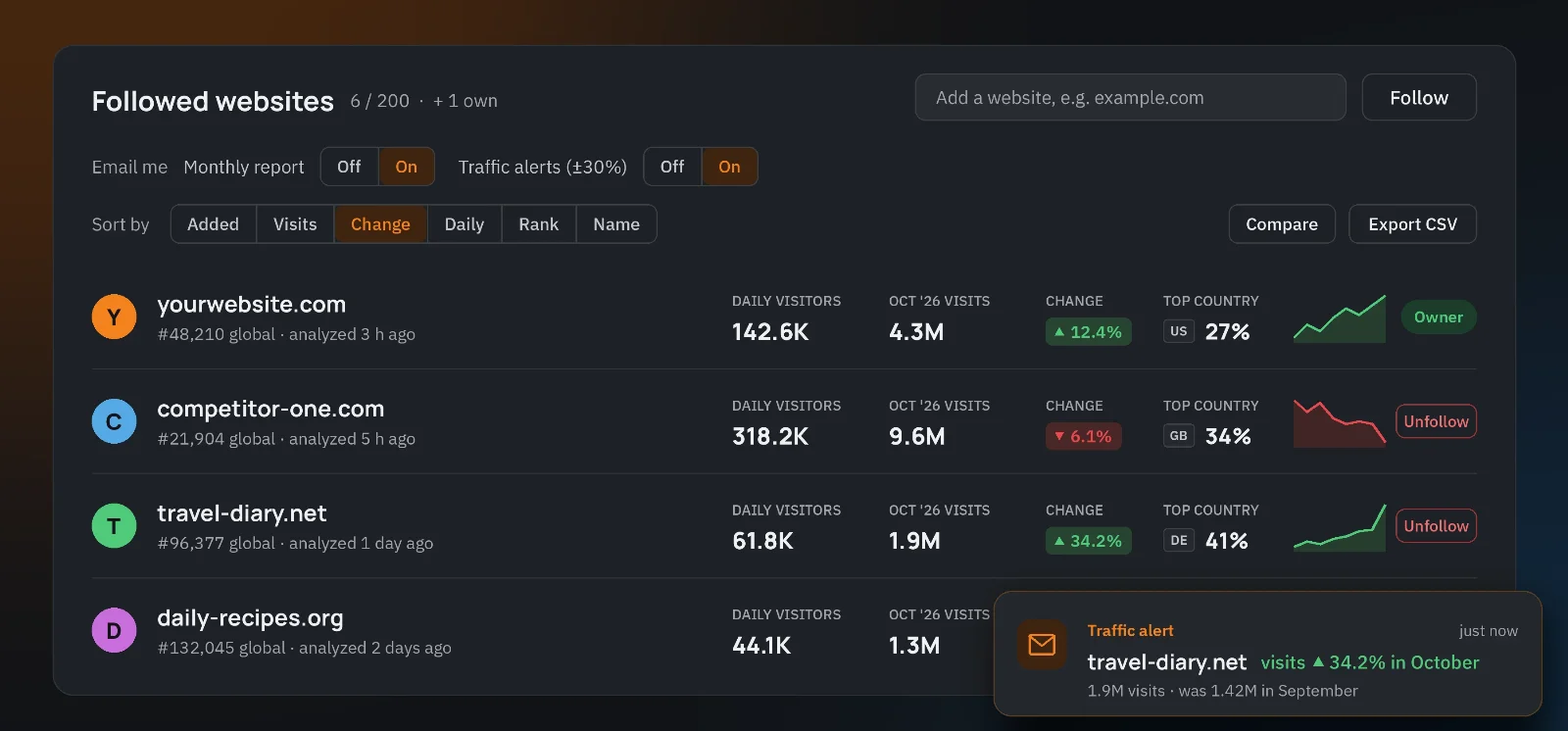
In our last post we promised user accounts and an API. Both are now live, together with a personal dashboard, email alerts and a new browser extension. Everything described here is free.
Free HypeStat Accounts
You can now create a free account in a few seconds. Sign in with your email address (we send you a one-time code, no password needed), with your Google account, or with a passkey, so you can log in with your fingerprint, face or device PIN. On the dashboard you can see every device where you are signed in and sign out of any of them.
Follow the Websites You Care About
Open any website profile and click Follow, or type a domain straight into your dashboard. You can follow up to 200 websites, whether they are your own sites, competitors or sites you simply find interesting. If a site has not been analyzed yet, we add it to the queue and the data shows up shortly after.
For every followed website the dashboard shows:
- visits in the last month and the change compared to the month before;
- daily visitors and HypeRank;
- the top country of its visitors;
- a small chart of the traffic trend.
You can sort the list by visits, change, rank or name, pick two sites to compare side by side, or export the whole list to a CSV file.
Monthly Reports and Traffic Alerts
If you want, HypeStat can email you about your followed websites. Both options are off by default and you can turn them on in your dashboard:
- Monthly report – a short summary of all your followed websites once a month.
- Traffic alerts – an email when the traffic of a followed site goes up or down by 30% or more, or when a new site gets its first traffic data.
Every email has a one-click unsubscribe link, no login required.
Manage Your Own Website
If you own a website, click Manage this site on its profile. After you verify ownership with a DNS TXT record or a small file on your server, you can:
- write your own description of the site, shown on its profile;
- hide WHOIS details;
- hide traffic and revenue estimates;
- connect Google Analytics, so the profile can show your real numbers instead of our estimates.
The verification code is tied to your account, so only you can make changes to your website's profile.
The HypeStat API
Developers can now use the new HypeStat API. Create up to three API keys in your dashboard and request the same data you see on a website profile: traffic, rank, technologies, hosting, SEO, security, DNS, WHOIS and more, all in JSON. You can also get lists such as top websites by country or category, websites using a technology, sites on a hosting network, and trending websites.
The API is free while it is in testing: up to 60 requests per minute, 1,000 requests per day, and 50 website analyses per day. The API Builder lets you put a request together and test it in the browser, and an OpenAPI file is available for tools that read it.
Trending Websites and Traffic History
Website profiles now keep a history of monthly visits, so you can see how a site has grown or declined. The new Trending pages list the websites with the biggest traffic gains and drops from one month to the next.
A New Browser Extension
HypeStat Analyzer 3.0 shows the key statistics of the website you are on with one click: traffic, rank, technologies, hosting and more. It is available for Chrome, Firefox, Edge and Opera. The extension reads only the domain of the current tab when you click it. It does not collect your browsing history.
In Chrome you can also install HypeStat as an app: click the install icon in the address bar and HypeStat opens in its own window.
What's Next
Next we are adding a history of changes for every website: when it switched technologies, hosting or CDN, added ad networks or started blocking AI crawlers. After that comes a HypeStat connector for AI assistants. If you have an idea or something does not work as expected, please contact us. We read every message.
Thank you for using HypeStat!


